Importing a pedigree
Bring in an existing family from an Evagene file, GEDCOM, XEG, an image, or 23andMe. Each format opens its own short modal, and where you already have people on the canvas, imports let you choose between starting fresh and adding to what is there.
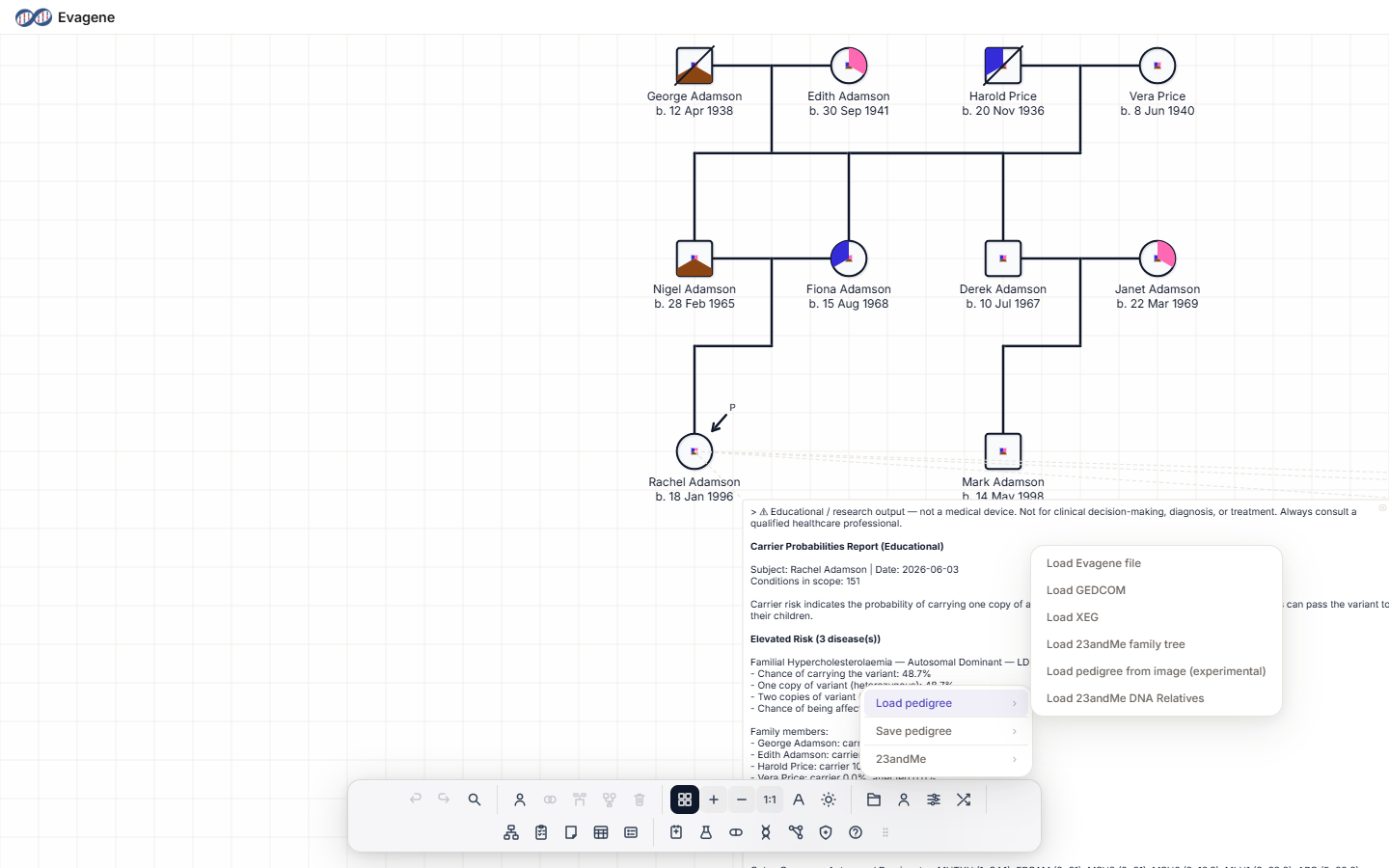
Where to find it
Open the File operations button (the folder icon) in the dock, then the Load pedigree submenu. Every import option lives here.
Import formats
The Load pedigree submenu offers six entries. The first four build a pedigree; the last two cover 23andMe imports, one of which is a read-only summary.
| Menu item | File types | What happens |
|---|---|---|
| Load Evagene file | .json | If the current pedigree is not empty, a Load Evagene File modal offers “Load as new pedigree”, “Add to current pedigree”, or Cancel. |
| Load GEDCOM | .ged, .gedcom | An Import GEDCOM modal opens; the family is imported and automatically laid out. |
| Load XEG | .xeg | If the file contains diseases, a disease-matching step lets you map each imported disease to an existing one or create it, then a load-mode modal appears. |
| Load 23andMe family tree | .json | An Import 23andMe Family Tree modal opens. |
| Load pedigree from image (experimental) | image/* | An Import From Image modal opens. |
| Load 23andMe DNA Relatives | .csv, .txt | Shows a read-only DNA Relatives (N matches) summary — name, predicted relationship, % DNA shared, and maternal/paternal side. It does not add anyone to the pedigree. |
New pedigree vs add to current
When the pedigree already has people, imports offer two choices: Load as new pedigree replaces what is on the canvas with the imported family, and Add to current pedigree merges the imported people in alongside the existing ones. If the canvas is empty, the import simply loads.
Worked example · Import a GEDCOM as a new pedigree
We will load a fictional family supplied as a GEDCOM file and let Evagene arrange it.
- 1Open the menu. Click File operations in the dock, then Load pedigree → Load GEDCOM.
- 2Choose the file. Pick a
.gedfile from the file picker. - 3Choose the mode. In the Import GEDCOM modal, choose Load as new pedigree.
- 4Done. The family is imported and auto-arranged on the canvas.
Good to know. Load 23andMe DNA Relatives is read-only: it shows a match summary but never adds people to your pedigree. To build a tree from 23andMe, use Load 23andMe family tree instead. The image importer is marked experimental — check the result against the source before relying on it.
About Evagene. Evagene is an academic, research, and educational pedigree modelling platform. It is not a medical device and is not intended to diagnose, prevent, monitor, predict, treat, or manage disease, or to determine eligibility for screening, testing, referral, or treatment, or to replace professional clinical judgement. Outputs are illustrative and for educational / research purposes only.