Pedigree & relationship properties
Two panels sit alongside the individual editor: Pedigree holds settings for the whole drawing, while Relationship lets you edit a single couple — their consanguinity and the events that bind them, such as marriage or divorce.
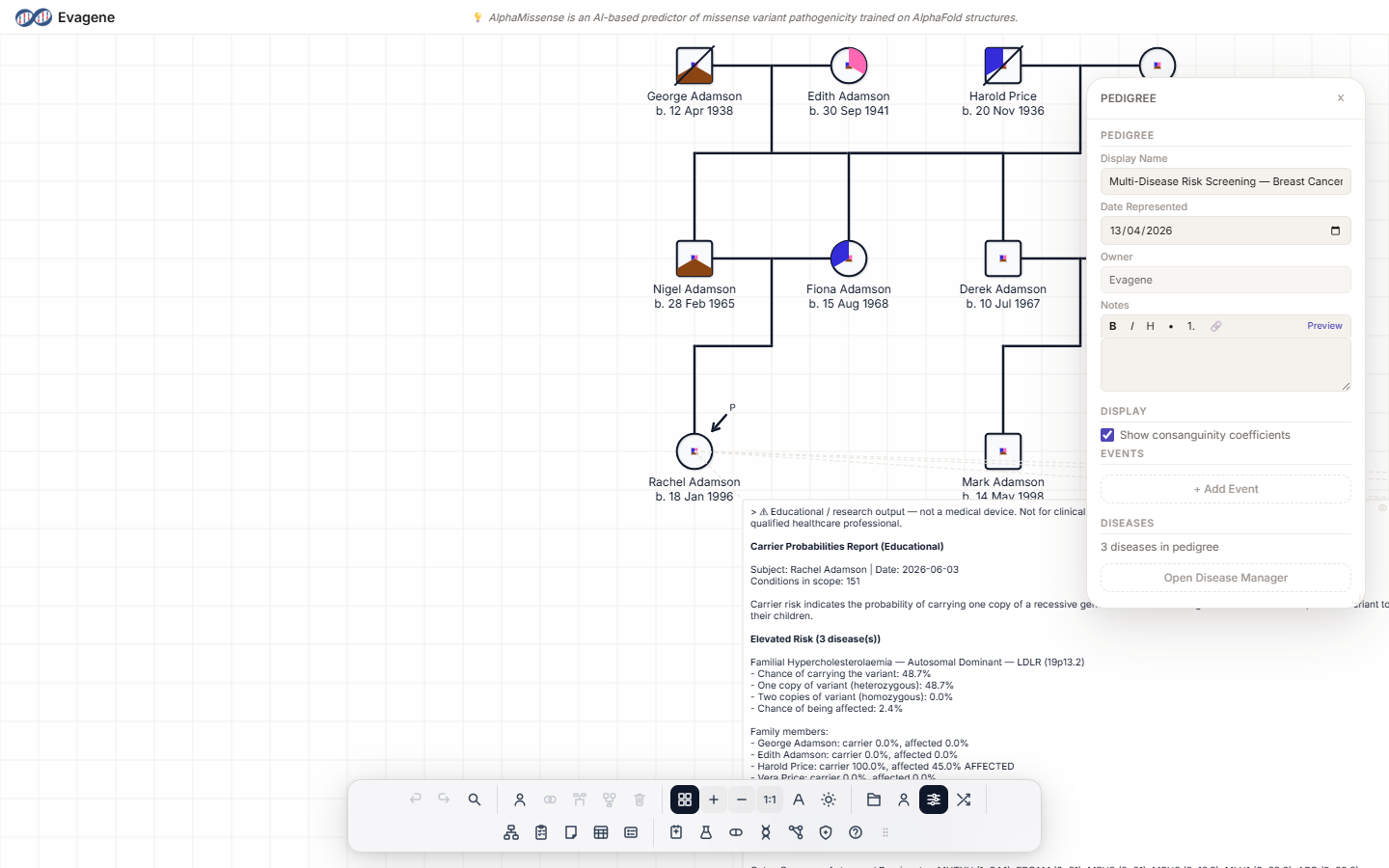
Pedigree properties
Where to find it
Click the Pedigree properties button in the File group. The floating Pedigree panel opens; drag it by its titlebar and resize it from any edge or corner. Its dock icon highlights while the panel is open.
What you can set
Under the Pedigree heading:
- Display Name — the name of the pedigree.
- Date Represented — the date the pedigree depicts, set with a date picker.
- Owner — read-only.
- Notes — a markdown field.
Under the Display heading there is a Show consanguinity coefficients checkbox, on by default. The panel also carries a pedigree-level Events editor and a Diseases summary that reads “N diseases in pedigree” with an Open Disease Manager button.
Relationship properties
Where to find it
The relationship panel has no dock button. Open it by clicking the horizontal partnership line between two people. The floating Relationship panel opens; like every panel it is draggable by its titlebar and resizable from any edge or corner.
What you can set
| Field | What it does |
|---|---|
| Display Name | A label for the partnership. |
| Consanguinity | Read-only until you tick the Manual checkbox beside it; you can then enter a coefficient between 0 and 1. |
| Show coefficient on pedigree | Checkbox that prints the coefficient on the drawing. |
| Notes | Free-text notes for the relationship. |
| Events | An editor whose types are Marriage, Divorce, Separation, Partnership, Engagement, and Pregnancy. |
When a non-zero consanguinity coefficient is set, Evagene renders a double line on the partnership to mark the consanguineous union.
Worked examples · A named pedigree and a consanguineous union
Two short tasks on the fictional pedigree PED-118.
A · Name the pedigree
- 1Open Pedigree properties from the File group of the dock.
- 2Set the Display Name to “Family Ashworth” and pick a Date Represented with the date picker.
- 3Toggle Show consanguinity coefficients under the Display heading to decide whether coefficients print on the drawing.
B · Record a consanguineous union
- 1Click the marriage line joining two first cousins in the family — the floating Relationship panel opens.
- 2Tick Manual beside the Consanguinity field to make it editable.
- 3Type 0.0625 (the coefficient for first cousins). A double line renders on the partnership to show the consanguineous union.
Good to know. The Consanguinity field stays read-only on purpose — tick Manual only when you want to override the value yourself. The pedigree-level Show consanguinity coefficients checkbox controls the whole drawing, while each relationship's own Show coefficient on pedigree checkbox controls that single partnership.
About Evagene. Evagene is an academic, research, and educational pedigree modelling platform. It is not a medical device and is not intended to diagnose, prevent, monitor, predict, treat, or manage disease, or to determine eligibility for screening, testing, referral, or treatment, or to replace professional clinical judgement. Outputs are illustrative and for educational / research purposes only.