Related concepts
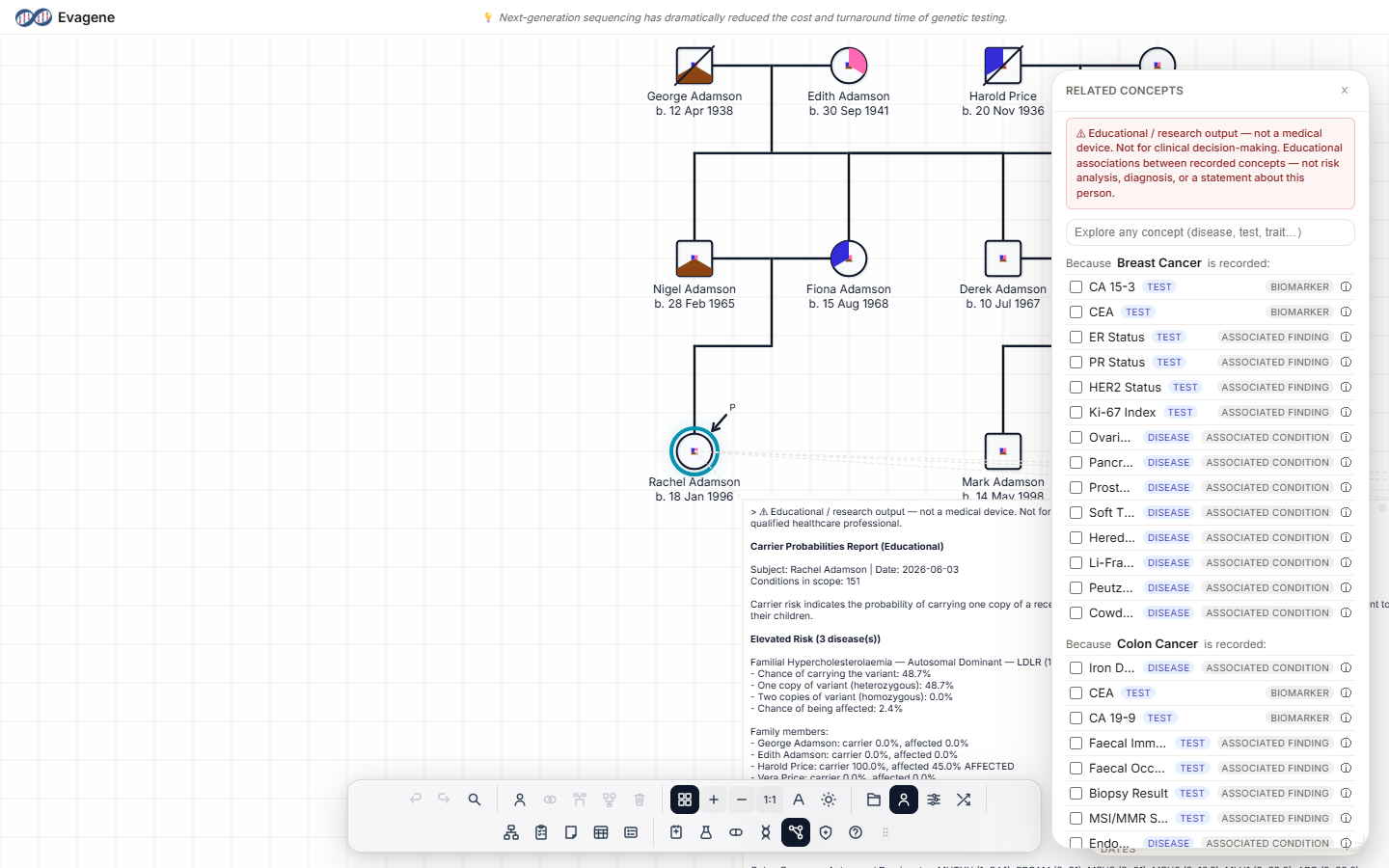
The Related concepts panel lets you explore educational associations between the things recorded on an individual — diseases, traits, tests, allergies, and genes. This is reference data, not risk analysis or diagnosis.
Where to find it
Click the Related concepts button in the dock — it sits between Genetics and Risk analysis. The floating Related concepts panel opens; drag it by its titlebar, resize it from any edge or corner, and watch its dock icon highlight while it is open. The panel refreshes whenever you select a different individual.
A banner runs across the top of the panel:
Educational associations between recorded concepts — not risk analysis, diagnosis, or a statement about this person.
This banner is part of the panel's design and can be turned off only at the account level, not inline.
Reading the associations
For each thing recorded on the selected individual, the panel shows a group headed “Because {item} is recorded:”. Each association appears as a row:
- A checkbox — tick it to record that concept on the individual; untick to remove it. The panel then re-renders, so newly added items surface their own associations.
- A name.
- A kind chip — disease, trait, test, allergy, or gene.
- A relationship chip describing how the two are associated.
- An ⓘ button titled “Why are these related?” that expands a short explanatory note.
Explore any concept
A separate “Explore any concept (disease, test, trait…)” search lets you browse any catalogue entity and read its “Related to {name}” associations without recording anything on the individual. It is a read-only way to wander the catalogue.
Empty states
| When | Message |
|---|---|
| No individual selected | “Select an individual to see concepts educationally related to what's recorded for them.” |
| Nothing recorded yet | “Record a disease, trait, clinical-test result, allergy, or marker for this individual to surface related concepts.” |
What this is — and is not
Related concepts is educational reference data, in the same family as the disease and trait catalogues. The correlation graph behind it holds over 1,100 curated educational associations. It never produces a risk number, it runs no inheritance analysis, and it asserts nothing about any individual. Ticking a row simply records a catalogue concept; the associations themselves are general, published relationships between entities, not findings about the person.
Worked example · Explore what relates to a recorded finding
Using the fictional pedigree PED-309, where individual I-3 already has a disease recorded.
- 1Select the individual. Click I-3 on the canvas; the Related concepts panel refreshes to show their recorded concepts.
- 2Read the group. Find the “Because {disease} is recorded:” group and scan its rows, noting the kind and relationship chips.
- 3Ask why. Click the ⓘ button on a row to expand the “Why are these related?” note and see why the two concepts are linked.
- 4Record a related trait. Tick a related trait's checkbox — it is now recorded on I-3, and the panel re-renders so the new trait surfaces its own associations.
- 5Browse freely. Type into “Explore any concept” to look up an unrelated catalogue entity and read its associations without recording anything.
Good to know. Ticking a row's checkbox actually records that concept on the individual — if you only want to read around the catalogue, use the Explore any concept search instead, which never changes the record. The banner at the top is a fixed reminder that these are educational associations, not statements about the person, and it can only be turned off at the account level.
About Evagene. Evagene is an academic, research, and educational pedigree modelling platform. It is not a medical device and is not intended to diagnose, prevent, monitor, predict, treat, or manage disease, or to determine eligibility for screening, testing, referral, or treatment, or to replace professional clinical judgement. Outputs are illustrative and for educational / research purposes only.