Risk analysis
Run the published risk models on your pedigree for teaching and research. Outputs are illustrative — not clinical recommendations.
Opening the panel
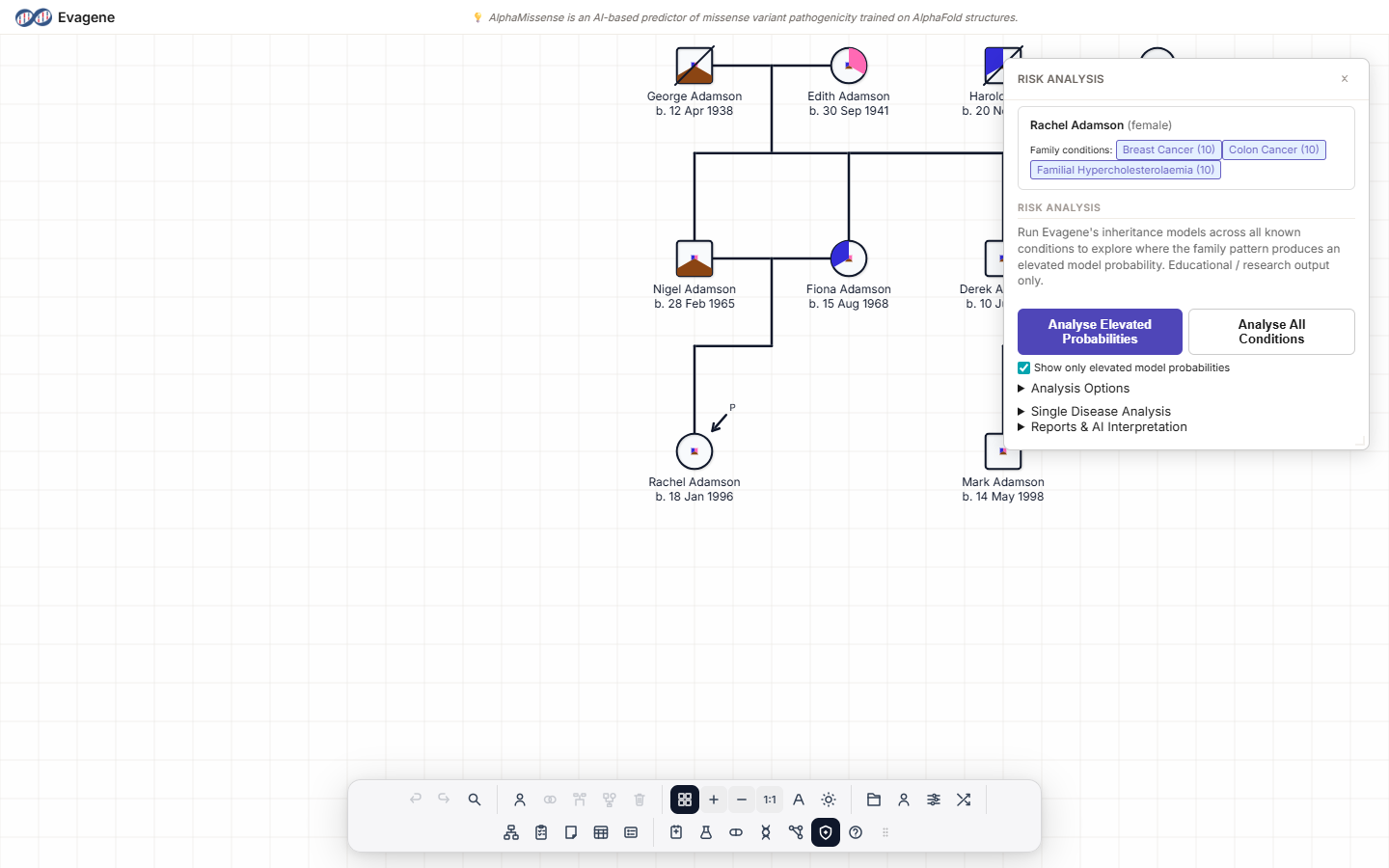
The Risk analysis dock button opens the floating, draggable, resizable Risk Analysis panel; its dock icon highlights while the panel is open. The panel needs a current pedigree and exactly one proband. With no proband it shows “No proband designated. Set an individual as the proband to enable risk analysis.” With more than one proband it asks you to reduce the selection to one.
Once a proband is set, the panel shows a Risk Profile card — a read-only summary of the proband — above a Risk Analysis screening section, a collapsible Single Disease Analysis section, and a Reports & AI Interpretation section.
Two ways to compute
Whole-pedigree screening
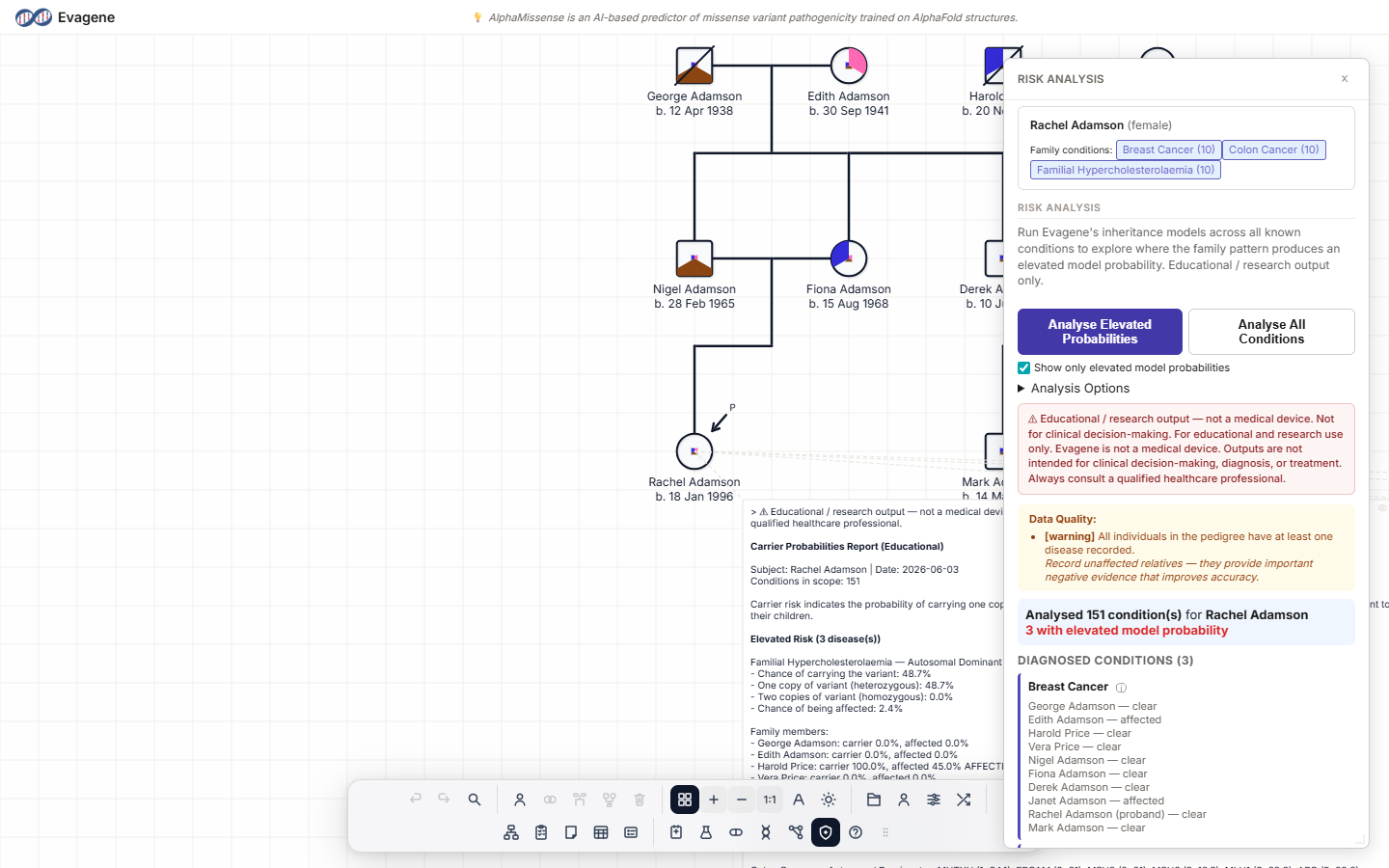
In the Risk Analysis section, Analyse Elevated Probabilities reports only conditions above the threshold, while Analyse All Conditions reports across the whole working set.
Single Disease Analysis
Pick one disease; its model is chosen automatically and shown as a badge. Optionally open Advanced Options to override the model or set parameters, then click Analyse.
Every screening result is prefixed with an educational-use banner reading “⚠ Educational / research output — not a medical device. Not for clinical decision-making.” The compute button in Single Disease Analysis is labelled Analyse.
Analysis Options toggles
A set of Analysis Options toggles shapes what each run produces:
- Carrier report — include carrier-probability output.
- Lifetime risk chart — render an illustrative cumulative-risk chart.
- Plain-language summary — add an educational summary in everyday language.
- Detailed analysis — expand the per-factor and per-member breakdown.
- Attach to canvas — pin the illustrative result to the pedigree.
- Include descendants — extend the analysis to the proband's descendants. The default risk threshold is 10%.
The four model families
Each page below covers one family of published models, with a worked example on a fictional family.
Single-gene & liability models
Mendelian · Liability-threshold (Falconer 1965)Built-in Mendelian and liability-threshold models that compute automatically from a disease's recorded inheritance pattern.
Cancer family-history scores & Tyrer-Cuzick
Claus · Couch · Frank · Evans · Gail · IBIS-stylePublished breast/ovarian and Lynch family-history scoring criteria, plus the IBIS-style Tyrer-Cuzick approximation, run across the whole pedigree.
BayesMendel: BRCAPRO, MMRpro, PancPRO
Bayesian carrier & future-risk modelsBayesian carrier-probability and future-risk models from the BayesMendel family, for educational and research exploration.
CanRisk / BOADICEA export
##CanRisk 2.0 file · canrisk.orgBOADICEA is not bundled. Evagene exports a CanRisk pedigree file that you upload at canrisk.org to run the model there.
About Evagene. Evagene is an academic, research, and educational pedigree modelling platform. It supports structured family-history documentation, teaching, and exploratory use of published risk models. Evagene is not intended to diagnose, prevent, monitor, predict, treat, or manage disease; determine eligibility for screening, testing, referral, or treatment; or replace professional clinical judgement. Outputs are illustrative and for educational / research purposes only.