CanRisk / BOADICEA export
BOADICEA is not bundled — Evagene exports a CanRisk pedigree file that you upload at canrisk.org to run the model there.
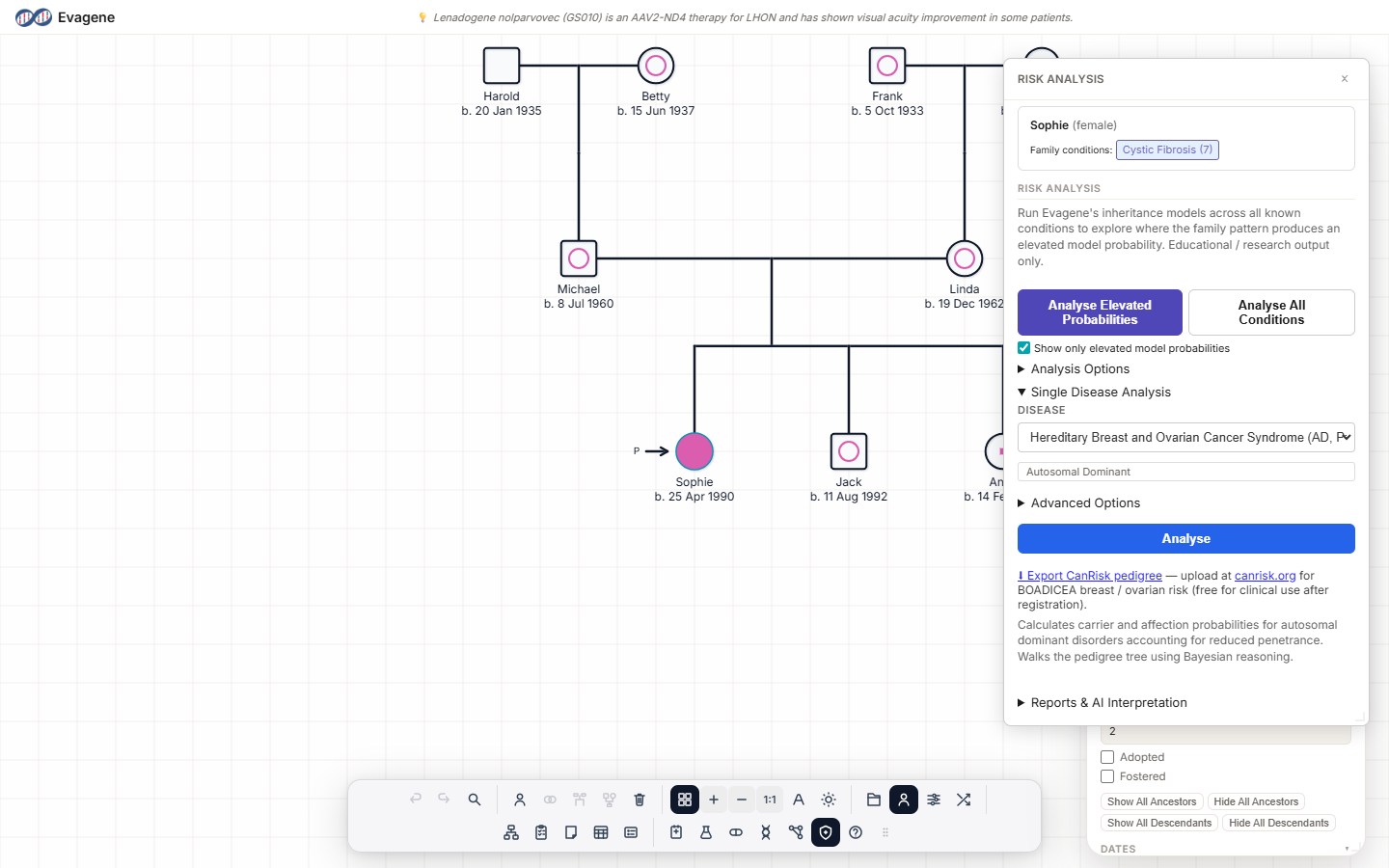
BOADICEA is not bundled. It is licensed by the University of Cambridge. Evagene exports a ##CanRisk 2.0 pedigree file (the BOADICEA v4 column set) that you upload at canrisk.org — free for individual use after registration — to run BOADICEA there. Evagene computes nothing for BOADICEA; the model runs on Cambridge's site.
Where to find it & what it needs
There are two ways to export the file. Both require a designated proband; without one the export fails with “This file needs a designated proband. Check the Risk Analysis panel for details.”
- From the Risk Analysis panel. Open Risk analysis from the dock, expand Single Disease Analysis, and click the ⬇ Export CanRisk pedigree link.
- From File operations. Go to File operations → Save pedigree → “Export CanRisk / BOADICEA pedigree”.
What the file contains
The download is a tab-separated .txt named like evagene-canrisk-<id>.txt, populated from your pedigree:
| Header | ##CanRisk 2.0 (BOADICEA v4 column set) |
| Structure | The full pedigree structure |
| Ages | Ages at diagnosis |
| Gene statuses | BRCA1 / BRCA2 / PALB2 / ATM / CHEK2 statuses |
| Ancestry | An Ashkenazi flag |
| Reproductive | Reproductive factors |
Why the model runs off-platform
The architectural separation is deliberate. Evagene does not compute BOADICEA; it produces a standard pedigree file that you choose to upload to Cambridge's site, where the model runs. This off-platform file exchange — rather than any clinical-workflow integration — is the design. The official site is https://www.canrisk.org.
Worked example · Export to CanRisk
A fictional family. Evagene only produces the file; the model itself runs on canrisk.org.
- 1Set one individual as the proband. The export needs a designated proband or it will fail.
- 2Open Risk analysis from the dock and expand “Single Disease Analysis”.
- 3Click ⬇ Export CanRisk pedigree to download the
.txtfile. - 4Go to canrisk.org, register or sign in, and upload the file to run BOADICEA there.
Good to know. Evagene never runs BOADICEA. The exported ##CanRisk 2.0 file is a handover to the University of Cambridge's canrisk.org, where the model computes. If the export fails with “This file needs a designated proband”, set a proband in the Risk Analysis panel and try again.
About Evagene. Evagene is an academic, research, and educational pedigree modelling platform. It supports structured family-history documentation, teaching, and exploratory use of published risk models. Evagene is not intended to diagnose, prevent, monitor, predict, treat, or manage disease; determine eligibility for screening, testing, referral, or treatment; or replace professional clinical judgement. Outputs are illustrative and for educational / research purposes only.