Interventions
Track treatments and interventions on an individual — dose, frequency, dates, status, and disease association. This documents a fictional family's history for teaching and research; it is not screening or clinical guidance.
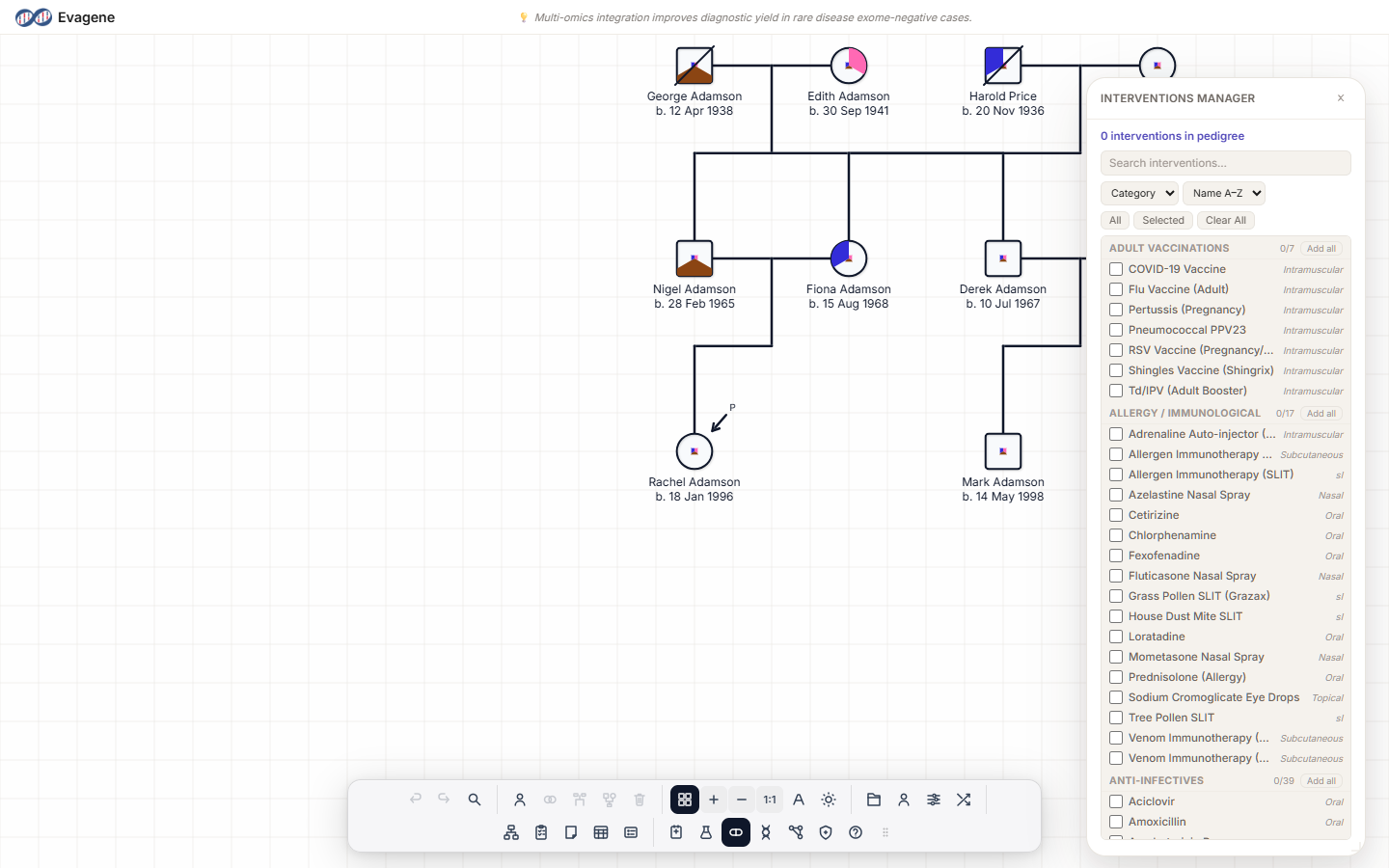
The two-level pattern
Interventions follow the same two-level pattern as the other catalogues:
- Pedigree level (the Manager panel). The Interventions Manager chooses which treatment types are active for the whole pedigree. A type's checkbox adds the type to the pedigree's working set; it records nothing on any person.
- Individual level (the properties panel). The actual record — dose, frequency, dates, status, disease association — is added in the Interventions section of the Individual properties panel.
Activate the treatment type for the pedigree first, then document it on the relevant individual.
Where to find it
Click the Interventions button in the dock to open the floating Interventions Manager panel. To document an intervention on a person, select the individual and open the Interventions section of the Individual properties panel.
The Interventions Manager (pedigree level)
The layout mirrors the Disease Manager and Investigations Manager. The panel opens with a summary reading “N interventions in pedigree”, and above the list you have:
- A “Search interventions…” box.
- A Group-by dropdown: Category / Route.
- A Sort dropdown: Name A–Z / Name Z–A.
- Quick filters: All / Selected / Clear All.
A treatment type carries a name, a category (e.g. Pharmaceuticals, Vaccinations, Surgery, Oncology Treatments), a route (e.g. Oral, IV, IM, SC, Topical, Inhaled), and aliases. A row's checkbox adds the type to the pedigree. The route is a property of the type — it is not entered per person.
Recording an intervention on a person (individual level)
Select an individual and open the Interventions section of the Individual properties panel. Click + Add Intervention, choose a type, expand it, and fill the fields in order:
| Field | Example / options |
|---|---|
| Dose | e.g. 500 mg |
| Frequency | e.g. BD, OD, PRN |
| Status | (none), Active, Completed, Discontinued, On Hold |
| Laterality | Where the intervention applies |
| Prophylactic | Checkbox |
| For disease | One of the diseases recorded on this individual |
| For manifestation | A recorded manifestation |
| Start date / End date | Treatment span |
| Notes | Free text |
The For disease dropdown is populated from the diseases already recorded on this individual — see the Disease catalogue page for how to add those first.
Worked example · Record a prophylactic medication
We will document a prophylactic medication on one individual in a fictional family — activating the type, then linking the record to a disease already recorded on that person. No real, named person is involved.
- 1Open the Interventions Manager. Click Interventions in the dock.
- 2Add the type to the pedigree. Add a treatment type (e.g. a pharmaceutical) by ticking its checkbox, then close the panel.
- 3Select the individual. Click the person on the canvas to open their Individual properties panel.
- 4Add the record. Open the Interventions section, click + Add Intervention, and choose the type.
- 5Fill the fields. Set Dose and Frequency, set Status to Active, tick Prophylactic, and link it to a recorded disease via For disease.
Good to know. The route (Oral, IV, IM, SC, Topical, Inhaled) belongs to the treatment type — you set it once in the Interventions Manager, not per person. The For disease dropdown only lists diseases already recorded on the individual, so document the disease first if you want to link to it.
About Evagene. Evagene is an academic, research, and educational pedigree modelling platform. It is not a medical device and is not intended to diagnose, prevent, monitor, predict, treat, or manage disease, or to determine eligibility for screening, testing, referral, or treatment, or to replace professional clinical judgement. Outputs are illustrative and for educational / research purposes only.